I’m the person who likes to keep their devices running as long as they run by digging through the internet for softwares that still support them. I try to use them as a single purpose device for what it can support. Besides giving it to family members who need it, it’s always fascinating how some of these devices can last.
I have a Tablet with 1 gig of RAM running Android 4.4, which still has some juice in it. I found some apps on F-Droid that allow it to still work as a media device. Movies are great, but YouTube has a vast trove of content for all ages. When YouTube and later NewPipe stopped working on it, it was devastating. The nature of technology is someone may already have a solution for your problem.
Open source for the rescue
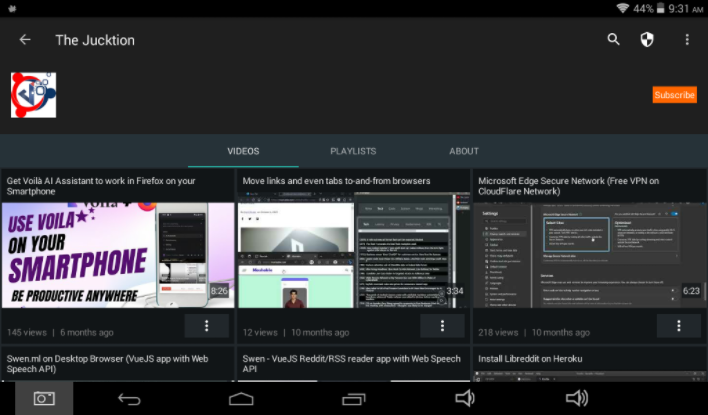
After a period of abandonment, I tried to look for a YouTube app on F-Droid again. This time, I found SkyTube. This amazing developer has builds for Android 4.4 and also older legacy devices. It’s built on NewPipe extractor, so you get the benefit of using the latest method of extracting videos to watch on your old devices.

It also has a “SkyTube Extra” version which supports Chromecast. You can find it in the projects’ GitHub page as it contains proprietary code. FDroid doesn’t allow proprietary code in its repository.
Features
SkyTube has a lot of options geared for an old device. As some devices are not capable enough for modern video rendering, there are options to use traditional video formats and legacy video player for a smooth operation. These are my favorite features.
- Subscribe and get your feed right on your frontpage
- Use a legacy video player if rendering is clunky.
- Choose traditional video formats if your device cannot handle modern video formats.
- Select the minimum and maximum resolution for the video to render
- Supports video downloads and comments
- Completely open-source with an alternative with Chromecast support
Drawbacks
The issue is not the app itself but that it depends on NewPipe extractor and by extension based on whims of YouTube changes. Any changes on YouTube will break operation of the app and you will need to wait for NewPipe developers to figure out a solution and then SkyTube developers to implement the fix. That could take a few days to weeks or longer. It’s never a guarantee that it will work or continue to work without problems. You can always contribute if you can, as they are both open source projects.
Installation
To install the SkyTube on your device, you’ll first need to download the app on your device to sideload it. GitHub doesn’t open on the browser for me, so how do you get the apk on your device? A file manager that can connect and download files will do the job. You’ll just have to send a link to it. MiXplorer still supports ancient Android devices and can copy internet files to your phone/tablet.
- Send the apk link from github to your old Android device
- Open the link in your browser, which may fail to load. (Keep the window open)
- Share the link to MiXplorer with its
Copy tofeature - MiXplorer will download the apk file to your device
Having SkyTube work on this device made it useful for movies, reading and YouTube. I take it while travelling and wouldn’t have to worry about entertainment or breaking it. Copy some movies and books for offline entertainment and YouTube videos if the location has internet.
If you’re interested in keeping your old devices running with alternative free or open-source apps, check out our post on Reusing old Android devices. There’s also ways to browse web and access https content by installing new trusted certificates from Let’s Encrypt.
Final Note: Running an old OS comes with issues with exploits and vulnerabilities. I keep them behind a DNS firewall and only use apps from trusted sources like F-Droid.