
Search engines like Google have a world of information about search queries and their usage. That information helps make it provide search suggestions to benefit user experience. Users save time and google gets more info about user interests.
Even without logging in, Google gathers information based on their IP addresses, browsing habits, and device usage (on Android). Google then creates user profiles based on user interests to show relevant ads across their advertising network. Users didn’t opt-in for this and has privacy implications. So what are your options for a private search engine and suggestions?
There are privacy friendly search engines and claim to not sell your information. But the thing with online services, you need to take their word for it. Search engines like DuckDuckGo, Startpage, Metager and Qwant are some privacy focused alternatives to Google search engine. But they are not open-source and self-host able.
SearX/NG is a self-host able meta search engine to search multiple search engines with an automatic suggestion feature. You can hook into it to receive suggestions as you search. While modern browsers include many search engines, self-host able options do not have that benefit as they have different hostname and aren’t always reliable.
So, we will implement the SearX engine to the Firefox browser manually and, while doing so, configure the search suggestion feature to give you suggestions as you search.
Mozilla Firefox (Desktop)
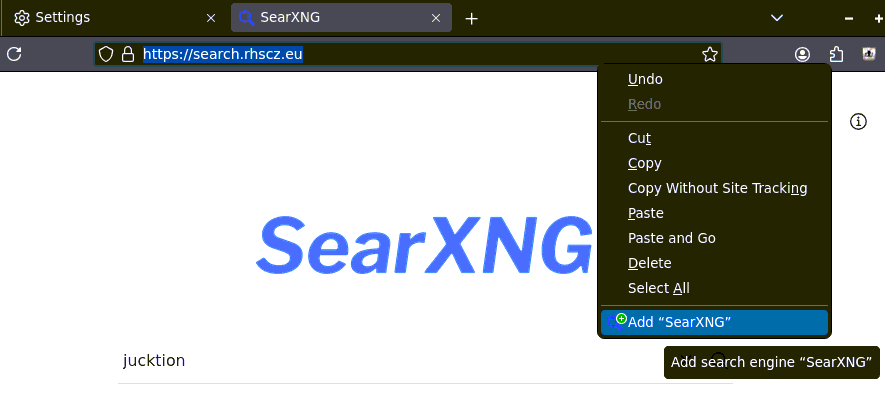
On the desktop Firefox browser, to add a search engine, even though it’s not obvious from the UX. Visit a SearX instance, then left click anywhere on the navigation bar and add it as a search engine, it will even configure the auto suggestion for the search engine.
Mozilla Firefox (Android)
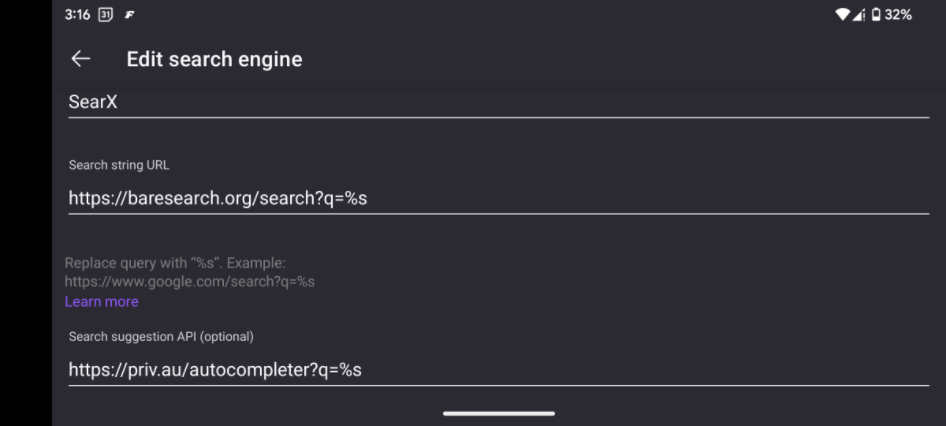
On mobile Firefox, users need to configure the search engine URL and the suggestions themselves. You can find the search engine section in this settings page of the browser. From there, you can add a new search engine by configuring its search engine and suggestions URL. Once you’re done, you can get suggestions on your mobile browser from search X without having to rely on mainstream search engines.
The steps are simple: just add a search?q=%s for search and autocompleter?q=%s at the end for the keyword suggestions.
Vivalid Browser (Desktop)
Vivalid gives you a lot of options and one of them is hoarding search engines. You can customize how your browser interacts with the search engine. You can use POST or GET requests, customize the search engine suggestions URL and even image search parameters. This allows users to set settings as they see fit. I chose a different SearXNG instance for search engines suggestions because it was closer to my location and didn’t want the suggestions to take as little time as possible.

The auto complete feature may not work with all SearX instances. You can find one that’s working on the SearX instances list. To check, load the auto complete URL in the browser (i.e. searx.org? autocompleter?q=hello). It will prompt you to download a file (autocompleter.bin) on mobile Firefox (doesn’t work in desktop browser). Open the file in a text editor. It should contain a list of suggestions based on your query.
After confirming, test a few searches to see if it works correctly. You can now enjoy your private search suggestions.