Android is versatile because it is an open platform. Developers share their apps without depending on a centralized app marketplace. Android also has a huge after-market ecosystem with custom ROM development and open source apps. This continues to be the defining differentiator against Apple’s closed ecosystem. Android users were never bound by a single app store. The availability of alternative app stores and the option to side-load apps have played a crucial role in maintaining the freedom of Android..
The open-source community is also a large part of Android popularity. There are privacy-conscious alternatives to well-known applications that prioritize user needs, being mindful of permissions, optimizing resources, and embracing open-source principles. There are still apps available and actively maintained that are compatible with Android 2.2 and earlier versions.
F-Droid is one such project that aims to create an alternative app-store with strict privacy requirements. F-Droid maintainers vet apps for well-known privacy and tracking code and only include code that are free from all these annoyances. The project currently features only open-source projects and serves as a go-to app store for open-source enthusiasts.
- File Manager
- PC Integration (Notifications/File/Clipboard) sharing
- YouTube
- Music Player
- Video Player
- Maps
- Activity Tracking
- Workout Tracking
- Torrent
- Launchers
File Manager
File managers are probably one of the most important app for an Android device. It’s a miracle that we have apps that still support ancient Android devices.
MiXplorer (Android 2.2+)
MiXplorer is an amazing file explorer that combines a lot of useful features into a single package. It has a customizable interface with many file editing features. It also supports add-ons to extend its feature sets. Addons include archive, ebook reader, video codec, image tagger.
MiXplorer is not an open-source project, but it is serves multiple purposes and is available for free. It can copy files, archive and decompress files, and act as an image viewer, video player, music player out of the box.
For file sharing, it can create a local (S)FTP/HTTP/SMB1/DLNA server so you can use it to transfer files to and from other devices.
MiXplorer is available on Play store, but it is a paid application there. But you can get it from the developers google drive.
https://drive.google.com/drive/folders/1BfeK39boriHy-9q76eXLLqbCwfV17-Gv
PC Integration (Notifications/File/Clipboard) sharing
KDE Connect (Android 5.0+)
KDE Connect is a multi-device communication platform to share files, notifications, clipboard and more. You can get notifications for calls and messages on your PC. Users can use your phone as a multimedia controller for your PC on Linux. The touchpad functionality allows it to serve as a substitute for a mouse on your computer.
KDE Connect secures the communication between devices, ensuring that users can feel confident that their conversations and notifications are safe from prying eyes. Users can also browse phone storage from their computers, and use “find my phone” feature to locate their phone, when connected.
To use these features, KDE Connect must be available on all devices that need to communicate with each other. KDE Connect is a project from the well-know KDE Linux desktop environment project. It is very trustworthy and it will remain free and devoid of any tracking or advertisements.
https://f-droid.org/en/packages/org.kde.kdeconnect_tp
YouTube
SkyTube (Android 4.0+)
SkyTube is a YouTube video player that still supports the old versions of Android. Users have the option to transform and repurpose their old devices into simple entertainment systems. It uses the latest NewPipe extractor, ensuring that you receive the most recent updates as well.
Available at F-Droid store.
For Android 4.0+
https://f-droid.org/en/packages/free.rm.skytube.legacy.oss
For Android 4.4+
https://f-droid.org/en/packages/free.rm.skytube.oss
Music Player
Little Music Player (Android 2.3+)
This music player is a really basic but is compatible with playlists. It will also allow users to stream audio remotely with http/https stream URLs. The app only has a basic interface without a player interface, but it would allow old devices to be used as a standalone music device.
The same developer has another app called Tiny Music Player, which supports devices with Android 1 and up. Tiny only uses the notification media control for its music controls. And that’s about it.
https://f-droid.org/en/packages/com.martinmimigames.littlemusicplayer
https://f-droid.org/en/packages/com.martinmimigames.tinymusicplayer
Apollo Music Player (Android 4.1+)
People who tinkered with their phones in the early 2010s will know this name all too well. Apollo was the default music player in CyanogenMod, an after-market custom ROM development project for multiple devices.
This app is a fork that is still being maintained. It has an integrated equalizer, will sort your songs based on the frequency of usage. The design is a simple and easy to learn as well.
https://f-droid.org/packages/org.nuclearfog.apollo
Gramophone (Android 5.0+)
Gramophone is a music player that is both rich in features and aesthetically pleasing. It strictly follows the material design language to make it a familiar experience. It supports adding lyrics to your media files and is planning to add online streaming to its list of features.
https://f-droid.org/en/packages/org.akanework.gramophone
Video Player
VLC (Android 4.2+)
VLC is a well-known media player that is still supports old android devices. You can watch videos and movies from your local storage or from the internet. VLC supports a wide range of video codecs.
However, some modern codecs may not be compatible with older devices, which may lead to lag or glitches. Old devices also may not have enough resources to run modern video files. You may have to convert them into compatible content to view them smoothly.
https://f-droid.org/en/packages/org.videolan.vlc
Maps
Organic Maps (Android 5.0+)
Organic Maps is an open-source spin-off of Maps.me. It uses OpenStreetMap for its offline maps and navigation. It is a great app for travelling to new places, cycling routes, hiking trails, and walking paths with turn-by-turn navigation. Users can bookmark locations and load trail information from GPX files. OpenStreetMap may lack extensive details for every road worldwide, yet it remains a highly reliable and adaptable tool. It allows you to edit points of interest to submit to OpenStreetMap.
Plus, there are no ads or tracking, unlike other alternatives.
https://f-droid.org/en/packages/app.organicmapsT
Activity Tracking
Gadgetbridge ( Android 5.0+)
Gadgetbridge is an offline fitness and activity monitoring application that keeps your data private from data harvesting. It keeps your data in your hands and yours to analyze.
Gadgetbridge is an open-source project and volunteers provide support for devices they use. This means there are a limited number of devices it supports. While there are a limited number supported device, most popular fitness and smart watches should be on the list. It’s a perfect app to track your sleep, steps, heart rate and activity.
This could help you use an old device as a separate activity tracker, so you do not need to take your personal device on your runs, hikes, etc. The app allows you to export your data so you can transfer it to store it safely.
https://f-droid.org/en/packages/nodomain.freeyourgadget.gadgetbridge
Workout Tracking
FitoTrack (Android 5.0+)
FitoTrack is a workout logging app to map your walk, hike, and run. Track vital information like date, time, duration, distance, speed, pace and the route while you are out. It also has audio cues, heart rate monitoring, GPX export, and approximate calorie calculator.
FItoTrack can also track indoor workouts such as Treadmill, Push-ups, Rope Skipping and trampoline jumping. It also has an offline map support for OpenStreetMap.
https://f-droid.org/en/packages/de.tadris.fitness
RunnerUp (Android 5.0+)
Similar to FitoTrack, it tracks your workouts. It also has configurable target pace, or target heart rate zones so you don’t overdo your workouts.
https://f-droid.org/packages/org.runnerup.free
With these two workout trackers, you have an option to pick one that fits your need. Go out and explore.
Torrent
Torrent Client (Android 2.3.3+)
Torrent Client is a simple torrent client that still supports some of the earliest of Android operating system. It allows you to open torrent files or magnet link so you can download your favorite files. It works well, and the UI is very responsive.
The only thing it is missing is sequential downloading, so it would suit downloading and watching videos simultaneously. Sequential downloading in torrent clients refers to a method where the data downloads in a specific order, typically from the beginning of a file to the end. This approach allows users to watch or use a file (like a video) before the entire download is complete.
The app was previously available on F-Droid. But now, you can download it from its release page.
https://gitlab.com/axet/android-torrent-client/-/releases
Launchers
Android devices usually always come with their own launcher. People rarely use third party launchers unless the default launcher misses basic features. People who like to customize their devices almost always have third party launchers that provide a more control over the Android experience. Here are a few.
For old devices, there are still good options.
Pie Launcher (Android 2.3+)
Pie Launcher is a simple launcher with a home screen, a circular app selector, and a search screen. It is a basic launcher that still supports ancient android devices. As of writing this post, it was last updated on July 3rd, 2024.
https://f-droid.org/en/packages/de.markusfisch.android.pielauncher
Kiss Launcher (Android 4.0.3+)
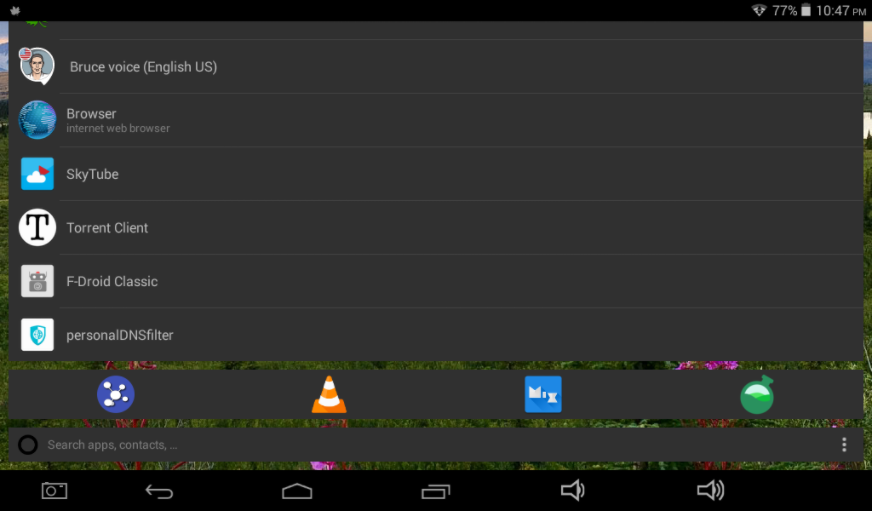
Kiss Launcher is not a traditional launcher with a home screen and an app drawer. The default interface is a search and recently used home screen. The search bar allows you to search for apps on your device without digging through the app drawer. You can also pin items on the home screen so they are always available.